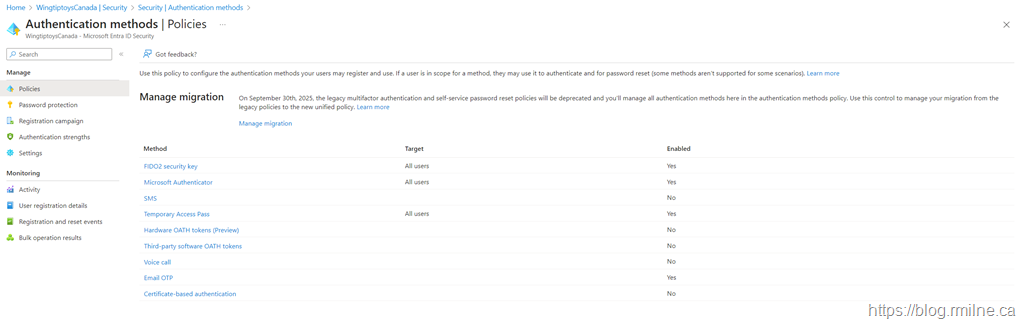
On September 30th, 2025, the legacy multifactor authentication (MFA) and self-service password reset policies will be removed and you'll manage all authentication methods here in the authentication methods policy. Use this control to manage your migration from the legacy policies to the new unified policy. Learn more
Traditional Azure Multi-Factor Authentication has served organizations well for years, but there is a requirement to embrace modern, unified authentication methods that provide stronger security, better user experiences and tighter integration with Entra ID. As legacy MFA is deprecated, administrators need to plan and execute a migration to the new authentication framework, which leverages Conditional Access, modern authentication protocols, and Entra ID authentication strengths. This post will walk through the considerations, challenges, and best practices for transitioning from legacy Azure MFA to Microsoft’s modern authentication methods, ensuring your environment remains secure and future-ready.
Please also see the initial post Time To Stop Using The Legacy Azure MFA & SSPR Portal
Aim of the Game
We ultimately want to start managing authentication methods for MFA exclusively in the new Entra ID Authentication Methods portal. This is the new portal that you see below.
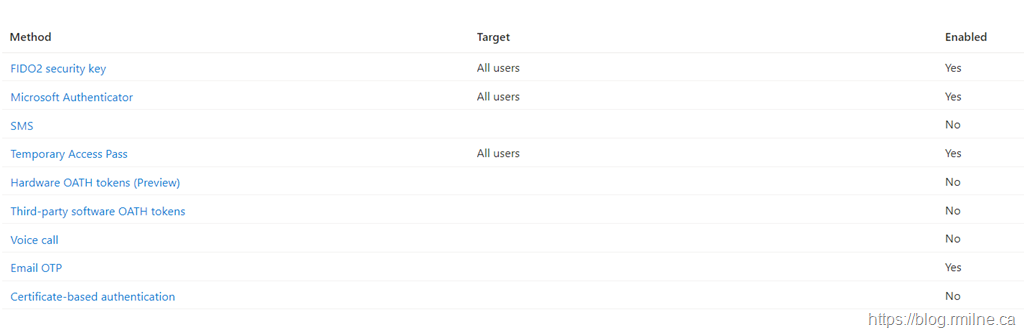
If we zoom in, there is a wide range of MFA options that are available. This includes FIDO2 along with all the original options.
The addition of FIDO2 is notable as this was an issue in the old SSPR solution. FIDO2 was NOT something you could use for SSPR, but you could use it to logon.
Planning Items & Issues
Note the below items when planning the migration:
-
Not every option from the legacy MFA and SSPR portals has a one-to-one equivalent in the new policy
-
Method targeting and policy scope confusion - scoping and exclusion is now possible
-
Method alignment issues - users may have used an older method that is no longer allowed under the revised policy
-
Reporting and visibility gaps is now via the new reports in Entra. No longer just listing who is Enabled/Enforced
-
Automation changes - use new reporting mechanisms
-
New options available for FIDO2, passkeys and Temporary Access Pass. Ensure that you looked at all of the
-
New method configuration options - ensure you look at the configuration for each method in the new portal
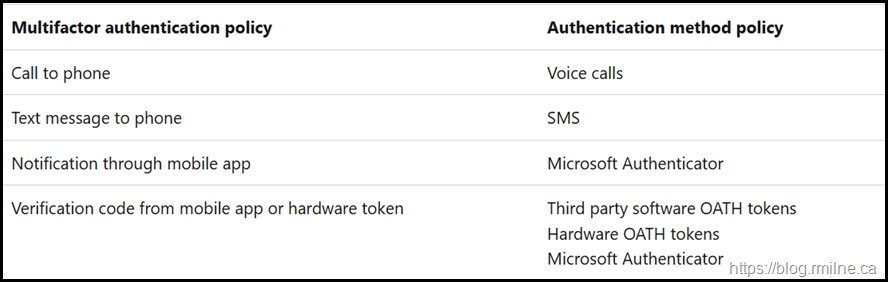
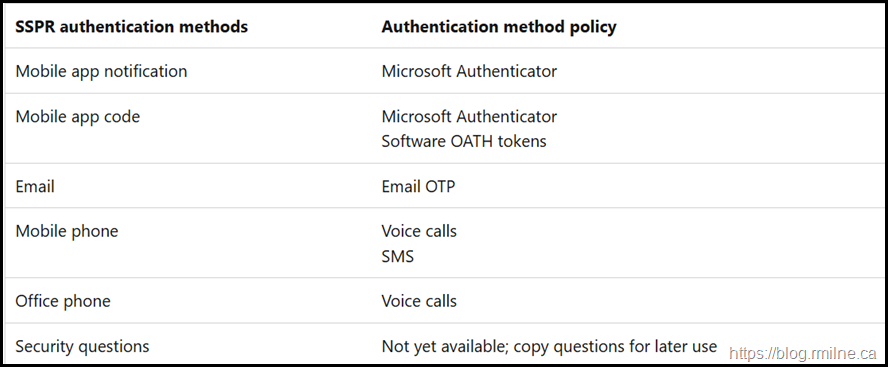
On the topic of mapping the old things to the new things, this is covered nicely in the docs.
For the legacy MFA policy and corresponding methods in the Authentication method policy refer to this mapping:
Record which users are in scope for SSPR (either all users, one specific group, or no users) and the authentication methods they can use. Security questions aren't yet available to manage in the Authentication methods policy, and will remain manageable in the legacy SSPR Authentication Methods settings.
Migrating to the new Authentication Methods framework modernises identity management, but it also introduces operational, communication, and policy-alignment challenges. Successful migrations require careful scoping, verification of method parity, and allowing time for replication and user education.
Migration Activities
You need to complete the migration to the new Authentication Methods in Entra ID because Microsoft is modernizing how authentication policies are managed, secured, and integrated across the identity platform. The legacy Multi-Factor Authentication (MFA) and Self-Service Password Reset (SSPR) policies are being retired and replaced by the unified Authentication Methods policy, which provides a single, centralised way to control how users authenticate.
We need to ensure that all of the different use cases and personas are mapped out. This means that you need to understand how your users are using MFA inside of the tenant and also to other tenants. Don't forget the latter aspect.
The existing SSPR & MFA Settings need to be reviewed, understood and documented. The settings in the legacy MFA and SSPR portal are to be moved over to the new Authentication Methods.
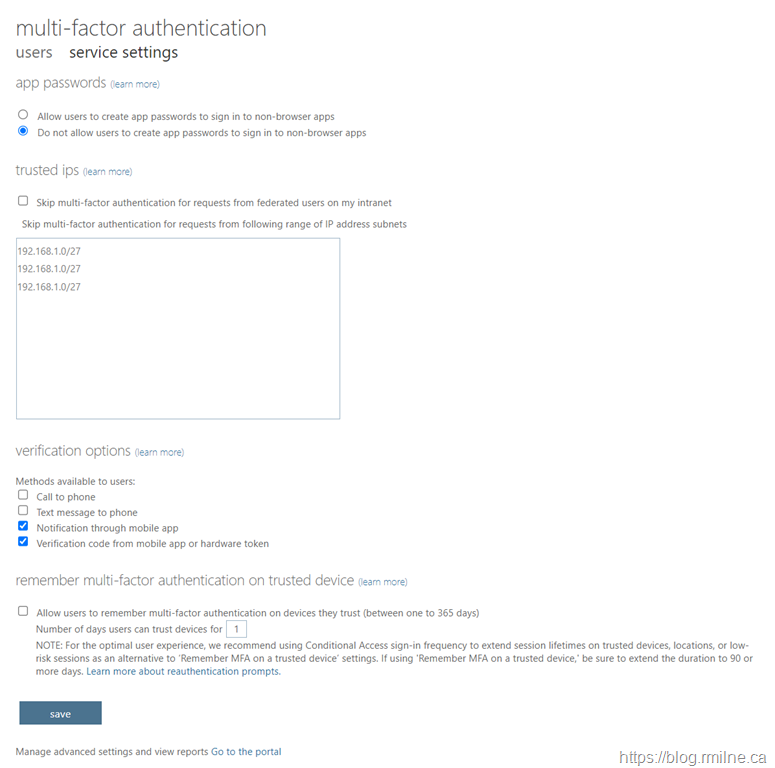
Below is an example of the starting legacy MFA portal settings. Note that some of the setting were changed from defaults. App passwords were disabled, along with the telephony MFA options. There are actually no IPs entered into the trusted IP section - those are just sample entries to illustrate CIDR format.
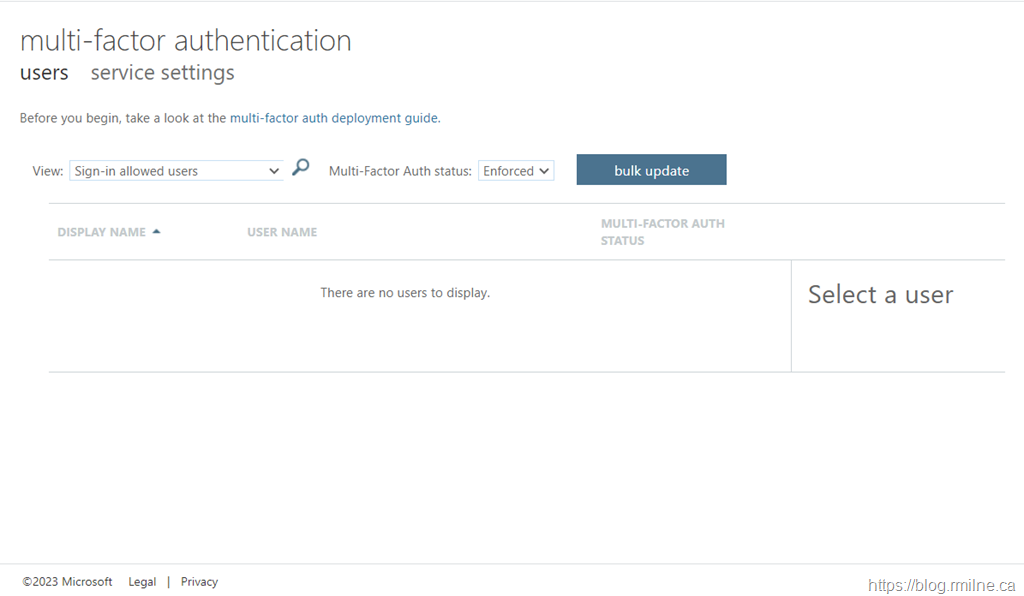
Check also to see if there are any users that are Enforced or Enabled for per-user MFA. Typically there are one or two accounts that were enabled over the years and were never reviewed. Nowadays Conditional Access should be used to manage settings wholistically rather than targeting individual accounts. Some of those may have been enabled via MSOL PowerShell way back when or done via the portal. Either way, they need to be reviewed.
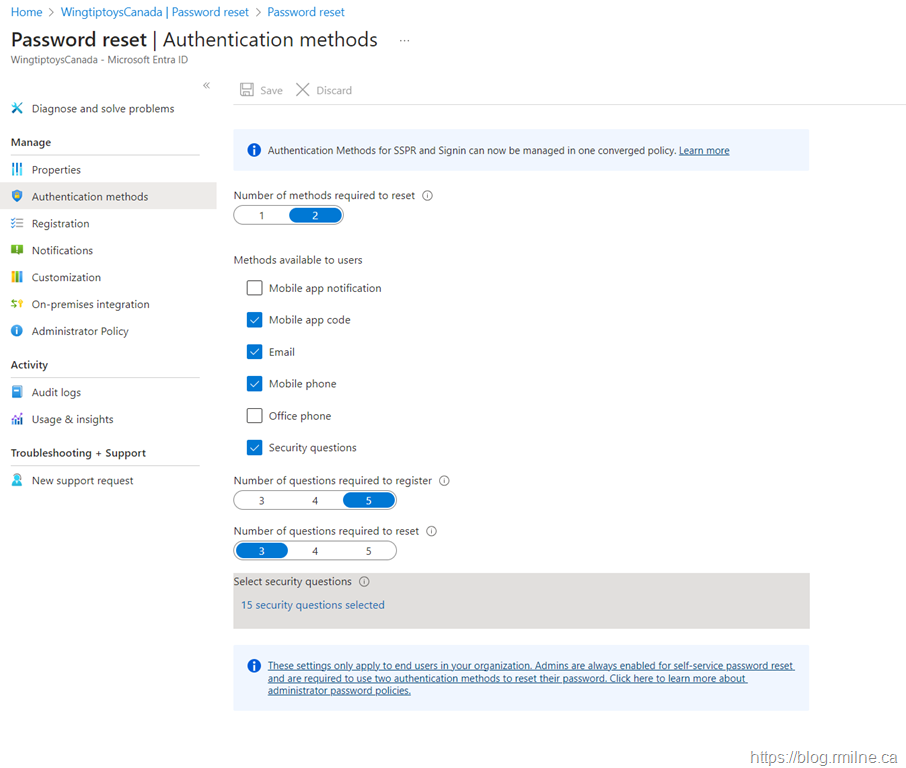
We must also review the authentication methods that were enabled in the SSPR portal.
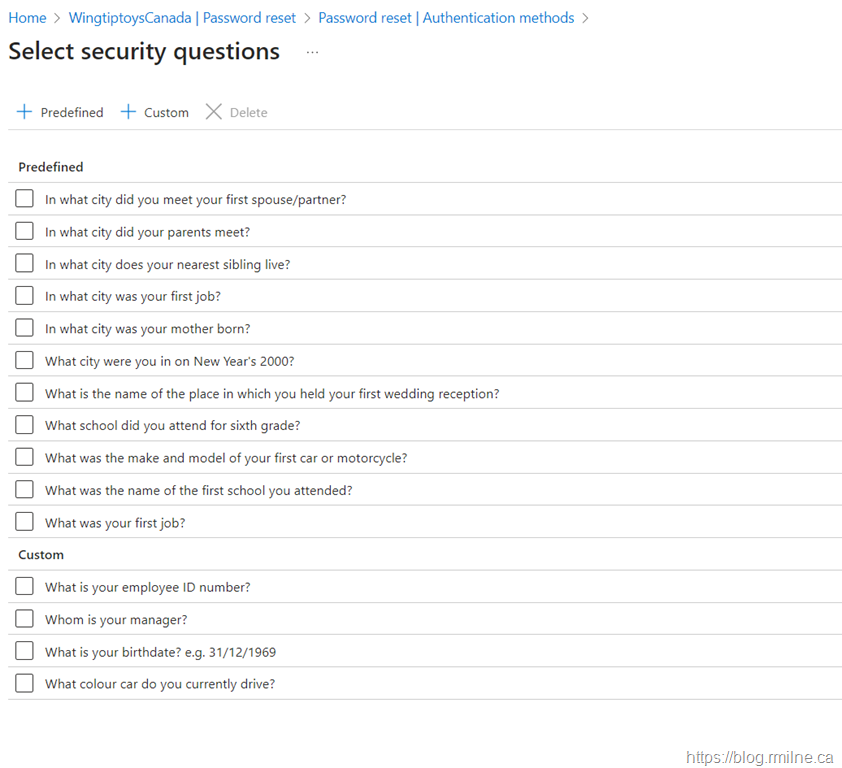
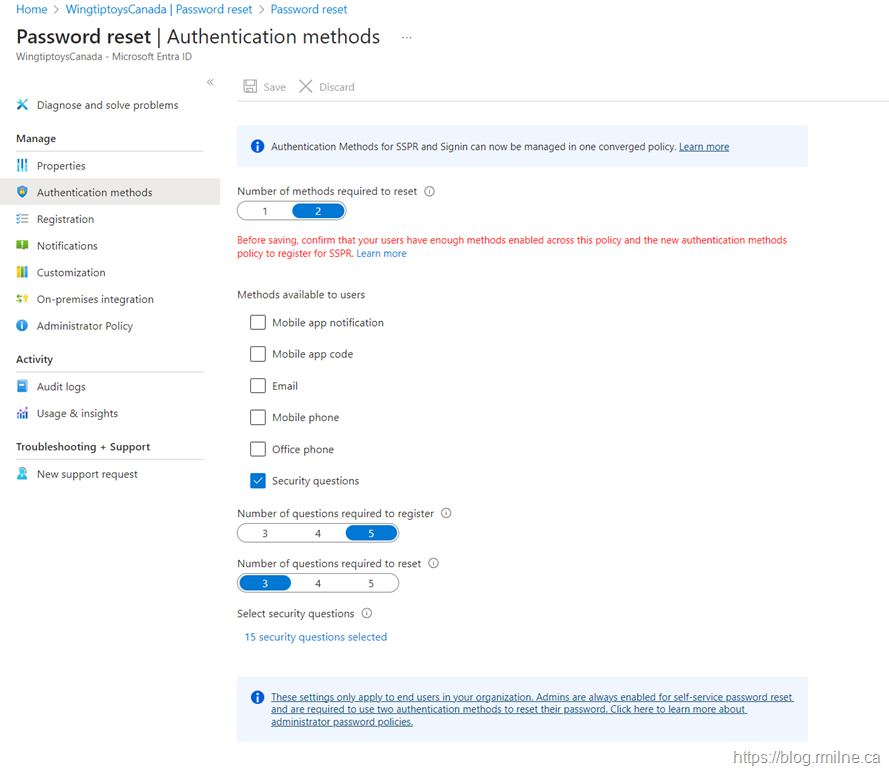
Note that security questions are not recommended. If you do use them, they will continue to be managed in the SSPR portal for now. Eventually they will be moved over to the new Authentication Methods portal.
Start The Migration
Initially you will be at the pre-migration stage.
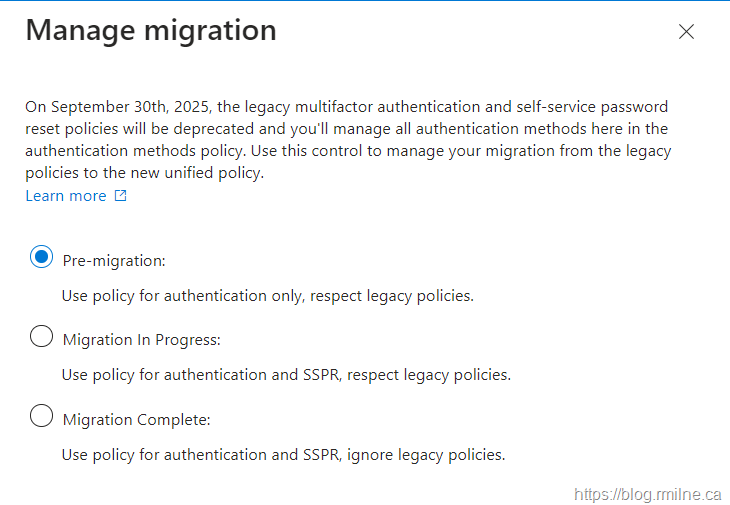
In the Authentication Methods, select the option to start the migration.
Then we start to use the authentication methods for both authentication purposes and SSPR.
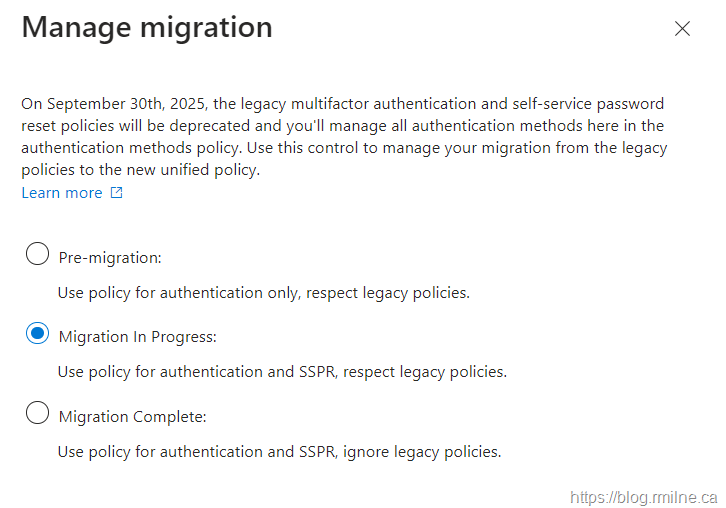
We then review and enable the appropriate authentication options in the new portal and scope them as necessary.
Once the settings have been ported over, they can be disabled in the legacy portals. For example, this is what the legacy MFA portal should look like one everything has been moved over.
Only once we have reached this point, can we complete the migration.
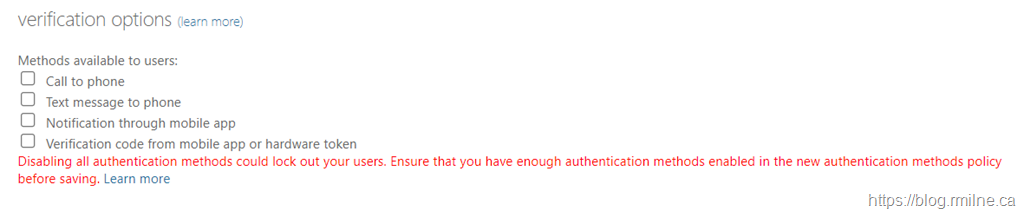
Disabling all authentication methods could lock out your users. Ensure that you have enough authentication methods enabled in the new authentication methods policy before saving. Learn more
Complete Migration
Once you are sure all of the necessary authentication options are enabled and are appropriately scoped, it is time to complete the migration. Don't worry - we can move back to the "Migration In Progress" stage. This is not a one-way street.
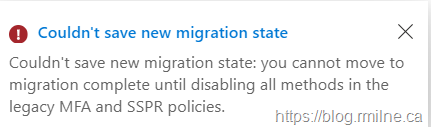
Note that you will not be able to complete the migration if you have not actually removed the methods from the legacy portals. You must have moved those options over.
In this example, the migration could not be completed as at least one method, apart from security questions, was left enabled in the SSPR portal.
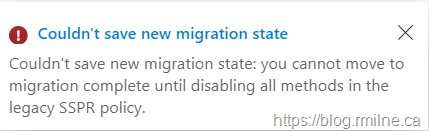
And in this example, at least one method was left enabled in the legacy MFA portal and also SSPR.
Note that if you *really* want to use Security Questions, then that option must be left enabled at this time. Currently there is no way to manage the questions in the new portal.
Moving Back
If needed, the migration complete can be walked back to migration in progress. Typically this may because of an issue, but really this should not be needed if you did the required planning and enablement.
The one case that caused issues, especially in a lab, was moving too fast. You need to allow time for the migration status to change in the back end. This takes time, and you should allow at least 5-10 minutes. See the Troubleshooting note below.
Troubleshooting
When migrating to the new Authentication Methods policy in Entra ID, moving the migration status from one stage to the next too quickly (for example, from "Migration in progress" to "Migration complete") can cause incomplete synchronisation of settings between the legacy MFA/SSPR policies and the new unified authentication methods policy.
In production, this is normally not an issue as the project with sit at "Migration In Process" for days if not weeks. This allows for testing and validation. Only once that is fully tested, is the migration marked as complete. In a lab or if you leave this to the last minute, you may be tempted to bang through the process in a few minutes. That will be a problem.
Here’s what typically happens in that lab scenario and why it’s a problem:
Incomplete replication. If you advance the status before this background replication completes, some settings (like who can use certain methods) might not fully migrate.
Policy mismatch. Because the legacy and new policies can temporarily coexist, moving too fast can cause Entra to disable enforcement from one system before the other is ready. This can lead to users losing MFA or SSPR access until the new policy finishes propagating.
Basically we need to allow time for the backend propagation. Jumping ahead too quickly can leave the tenant in an unknown state. If you don't allow time advancing migration stages too quickly can lead to broken or missing authentication configurations. Users may then be unable to sign in or add an authentication method.
Recommendation is to wait until all settings are fully reflected in the new Authentication Methods policy and verified in testing before marking the migration as complete.
Cheers,
Rhoderick
